


Colliz - DIY Wallpaper Craft
3.6267.00 Reviews
App Specs
- Version
- 2.0.8
- Updated On
- License
- Free
- Downloads
- 10,000,000+
- Developer
- Braly JSC
- Categories
- Personalization
- Platform
- Android
Screenshots
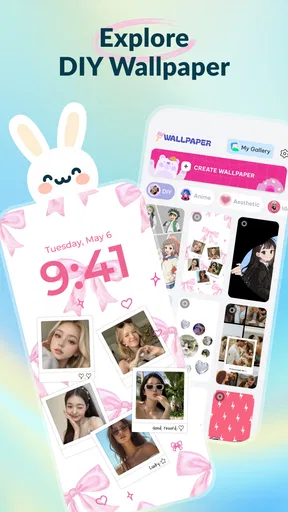
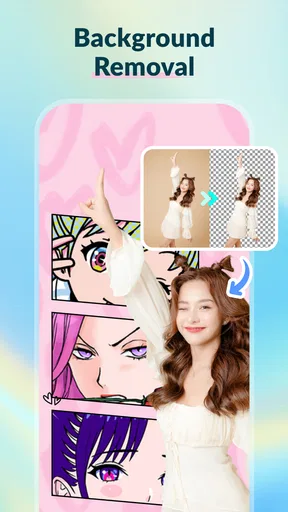
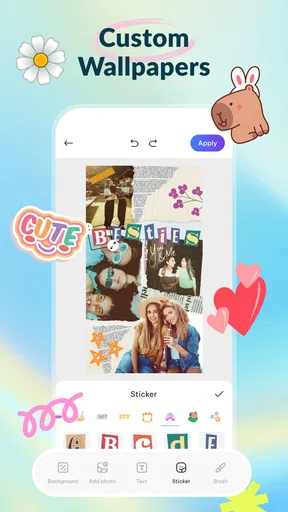
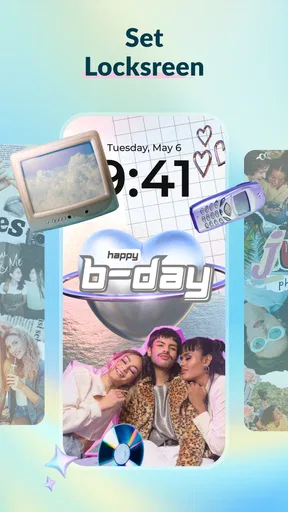
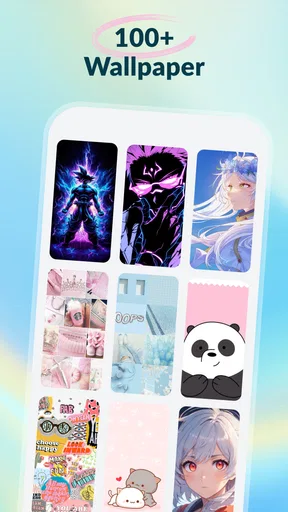
 Analysis by AppCompare
When I want a phone background that feels personal rather than pulled from the same wallpaper gallery everyone uses, a dedicated design app is appealing—but it also needs to be quick enough for a small creative break. Colliz - DIY Wallpaper Craft sits in that space: a personalization app from Braly JSC for making and exploring visual designs. I’d approach it as a playful design tool, not a full professional graphics studio, and that distinction helps set sensible expectations for both its speed and what you can make with it.
How quickly a wallpaper idea can take shape
The appeal of a wallpaper editor is that you can go from a vague color idea to something you can actually use without opening a desktop design program. Colliz’s template-led approach gives you a starting point, while a blank canvas leaves room to arrange a design yourself. In practical terms, templates are likely to be the faster route when you want a finished-looking result in a short session; building from scratch makes more sense when you have a particular image or arrangement in mind.
I’d keep the first session simple: choose a template or a small set of visual elements, settle on a color direction, and check how the result looks as a phone background before adding more detail. Wallpaper art is viewed behind icons and widgets, so a design that looks striking on a full-screen canvas can become busy once it is actually in use. Leaving a calmer area where app icons sit is a small decision that can make the finished image easier to live with.
The app’s stated focus on making DIY live craft wallpapers, photo collages, and discovering current trends points to more than a static wallpaper picker. That breadth can help when I want to browse before designing: a trend or collage idea might suggest a visual direction, even if I end up creating something simpler. I would not assume every project needs to use every kind of material or effect. A restrained design often works better on a home screen than a crowded one.
Getting Started with a Splash of Color
First things first, getting started with Colliz - DIY Wallpaper Craft is a breeze. You’ll be welcomed by a user-friendly interface that’s both intuitive and inviting. With a palette of vibrant colors and textures at your disposal, it’s hard not to feel inspired right off the bat. The app’s design is sleek and modern, making navigation a piece of cake. You can easily find your way through various features without feeling overwhelmed.
Once you’re in, the app gives you a blank canvas to start your creative journey. Whether you want to craft something from scratch or tweak existing templates, the possibilities are endless. The app is equipped with a variety of tools that let you play with patterns, colors, and images to create something truly unique. It feels like having a digital art studio right in your pocket!
Features That Make It Stand Out
Now, let’s talk features. The app is packed with options that cater to different design needs. You can choose from a wide array of templates if you’re in need of a little inspiration. The templates are diverse, ranging from minimalist designs to more intricate patterns. If you’re feeling adventurous, you can start with a blank slate and let your imagination run wild.
Worth Reading Before You Choose

Flipboard Shows What News Apps Must Do Beyond the Feed

Switching to Android Auto Means Rethinking Your Driving Routine

Google Calendar Makes a Crowded Week Easier to Manage

Ludo King Makes the Most of the Minutes Between Plans

Baby Panda World Brings Quick Play to Modern Phones, but Its Game Library Feels Busy

ESPN’s Live Game View Makes Following Close Games Easier
One of my favorite features is the layering tool. It allows you to stack different elements on top of each other, giving your wallpaper a sense of depth and complexity. Combine that with the app’s library of textures, and you can create some truly stunning visuals. The app also lets you import your own images, so you can personalize your designs even more.
Design choices that matter on a small screen
Layering is most useful when each added element has a job. For example, I’d use a personal photo as the focal point, then add a quieter texture behind it rather than piling on decorations that compete with the image. This is especially helpful for collage-style work: a few pictures with a shared color mood can feel intentional, while too many unrelated images can make a phone screen look cluttered. Making a quick draft before polishing it is a good way to judge the balance.
Imported images also make the app more useful for everyday personalization than a template-only editor. A favorite travel photo, a close-up of a plant, or a picture of a pet can give a wallpaper a personal anchor. I’d choose a photo with a clear subject and leave enough open space around it for the phone’s icons. If the source image is already busy, adding several textures and overlays may weaken it rather than improve it.
There is a practical trade-off between creative freedom and time. Starting from a blank canvas gives you more control, but it also means making more visual decisions; a template reduces that effort but may need adjustments before it feels like yours. I’d treat templates as a structure to customize, not a finished answer. Changing one or two things—such as the main color or the placement of an image—can be enough to make a design feel personal without turning a quick task into a long project.
Heavy-use moments and creative workflow
The most demanding moment for a wallpaper-making session is likely to be one where I’m combining several images, layers, and textures, rather than simply browsing or making a minimal pattern. That does not mean the app will necessarily slow down; it is a sensible point to pay attention to how comfortably it behaves on your own device. If a project starts to feel fiddly, I’d simplify the composition or work through one visual decision at a time instead of adding more effects just because they are available.
A realistic use case is making a coordinated background from photos after a weekend trip. I’d pick one image that still reads clearly at phone size, use a template or canvas as a base, and bring in only a couple of supporting details. Before settling on it, I’d check whether the important part of the photo lands beneath the clock or icon grid. That quick preview-minded check can save the disappointment of a beautiful image being obscured in daily use.
For a short break between errands, browsing for inspiration and adapting a template is a better fit than aiming for a detailed collage from scratch. If I have more time at home, I can try different arrangements and compare a simpler version with a more layered one. Keeping a clean first draft is useful here: it gives me a fallback if the more elaborate design becomes visually noisy or takes longer than I want.
Reliability, sharing, and the social side
For a creative app, reliability is not only about whether it opens; it is also about whether a design session feels predictable enough to finish. I would avoid treating a long, intricate composition as a one-sitting certainty until I know how the app behaves on my device. A useful habit is to make progress in manageable stages and avoid leaving a design unfinished when I’m about to switch tasks. That is sensible with any mobile editor, particularly when a project depends on several arranged elements.
Sharing and browsing other people’s work can make the app feel less like a solitary editor. I’d use that side for ideas—such as noticing a color combination or a layout that works well—not as a reason to compare every draft with polished community posts. A design that suits my own screen and taste is a better measure of success than trying to imitate whatever is currently popular.
For someone who prefers private, quick edits and has no interest in browsing or sharing, the community aspect may not add much. In that case, the core question is whether the canvas, templates, and image handling suit the way they like to work. On the other hand, if seeing other approaches helps you get past a blank page, social discovery can be a useful source of prompts even when you keep your own designs personal.
The Creative Community
What really adds an extra layer of fun to Colliz is its community aspect. You can share your creations with other users and get inspired by their designs. The app’s social features are a great way to connect with fellow creatives and exchange ideas. It’s like having a supportive art community right at your fingertips.
You can also follow other users to keep up with their latest designs. It’s motivating to see what others are creating and it might just spark a new idea for your next wallpaper masterpiece. The community aspect of the app really enhances the overall experience, making it more than just a design tool.
Who it suits, and what to expect on your device
Colliz is best suited to people who enjoy changing their phone’s look, like experimenting with color and texture, or want to turn personal photos into a more designed background. It can also work for a beginner who wants a guided starting point rather than learning a complex desktop editor. If you mainly want a ready-made background with no editing, a straightforward wallpaper gallery is probably more convenient. If you need precise professional controls for complex graphics, a more advanced design tool is a better match.
The app is free to install, with optional in-app purchases priced from $5.99 to $29.99 per item. I’d explore the free experience first and decide whether the tools I actually use justify spending anything; the presence of purchases does not mean every person needs them. It is rated for Everyone, has a 3.0 average from around 4,100 ratings, and has passed five million installs. Those figures suggest broad reach, but the modest average is a reason to keep expectations measured rather than assuming the experience will suit every device and workflow.
For device compatibility, the minimum operating-system requirement is Android 7.0. The current version is 1.1.12, and the app was released on November 5, 2025. Older or less capable phones can make any image-heavy editing session feel less comfortable, so I’d start with a modest design and see how smoothly browsing, editing, and moving between screens feels. I can’t promise identical responsiveness across devices; what matters is whether the app remains comfortable for the complexity of projects you actually make.
How it compares with simpler wallpaper options
A standard wallpaper gallery is faster when the goal is simply to find an image and apply it. A general photo editor may offer a familiar way to crop or adjust a picture, but it is not necessarily as centered on building a layered wallpaper or exploring design ideas. Colliz occupies the middle ground: it gives a casual user more room to compose than a basic picker, while keeping the purpose narrower and more approachable than a full graphic-design workspace.
That middle ground is also its limitation. If I only change my background once in a while, opening a creative editor may be more effort than the result warrants. If I enjoy making several versions, trying a collage, or adapting a photo into something that feels made for my screen, the extra steps have a clearer payoff. The right choice depends less on how many tools an app offers and more on whether you want to create or simply select.
Wrapping It Up
In conclusion, Colliz - DIY Wallpaper Craft is not just an app; it’s a creative playground. It’s perfect for anyone looking to add a personal touch to their device’s wallpaper. The blend of user-friendly design, extensive features, and a vibrant community makes it a must-have for any design enthusiast.
So, if you’re ready to dive into the world of DIY wallpaper crafting, give Colliz a try. Who knows? You might just discover a hidden talent or create the next viral wallpaper design. Happy crafting!
My performance verdict
I see Colliz as a relaxed, visual editor whose best results come from choosing a clear idea and building it in a few deliberate steps. Templates offer a practical shortcut, while layers and imported images provide room to make a background feel personal. For dependable day-to-day use, I’d keep designs organized and simple enough to remain readable behind phone icons, and I’d judge responsiveness on my own device before committing to a complicated session.
My recommendation is strongest for curious users who enjoy hands-on personalization and don’t mind experimenting. It is a weaker fit for anyone who wants an instant background with no creative decisions, or for someone who needs the control of professional artwork software. Used with those expectations, Colliz can turn a spare moment into a distinctive wallpaper without asking every project to become a major design exercise.
Pros
- Easy-to-use interface for beginners.
- Extensive library of design templates.
- High-quality export options available.
- Regular updates with new features.
- Supports multiple file formats for import.
Cons
- Limited free features without subscription.
- Occasional lag on older devices.
- Requires internet for full functionality.
- Advertisements in the free version.
- Some tools have a steep learning curve.
FAQs for Colliz - DIY Wallpaper Craft
What is Colliz - DIY Wallpaper Craft?
Colliz - DIY Wallpaper Craft is a creative app designed to help users craft personalized wallpapers for their devices. It offers a variety of tools and templates to customize designs, making it easy to express creativity and style through unique backgrounds. Ideal for those who enjoy DIY projects and personalized aesthetics.
Is Colliz - DIY Wallpaper Craft free to use?
The app offers a free version with basic features, allowing users to explore and create simple wallpapers. However, for more advanced tools and additional templates, in-app purchases or a subscription might be required. This provides access to premium content, enhancing the customization experience.
What customization options are available in Colliz?
Colliz provides a wide range of customization options including patterns, colors, and text overlays. Users can choose from pre-designed templates or start from scratch. The app also allows importing personal photos and integrating them into designs, offering a truly personalized wallpaper creation process.
Is Colliz compatible with all devices?
Colliz is compatible with most Android and iOS devices. However, it's always a good idea to check the app’s requirements on the respective app store to ensure compatibility with your specific device model and operating system version. Regular updates help maintain compatibility with new devices.
Does Colliz require an internet connection to function?
While many features of Colliz can be used offline, an internet connection is required to download new templates and updates. Accessing premium features or making in-app purchases also necessitates an internet connection. For the best experience, ensure your device is connected to the internet periodically.


